You have no items in your shopping cart.



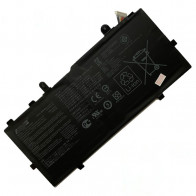
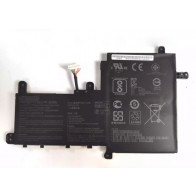
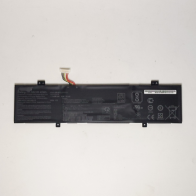
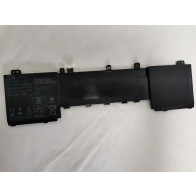
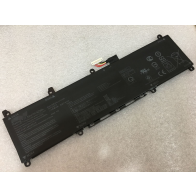
C31N1905 Battery For Asus Vivobook S13 S14 S433FA S333EA
Compatible Part Numbers: 0B200-03750100, 3ICP5/70/82, C31N1905
Availability: In stock
$65.19
Details
Details
C31N1905 Battery For Asus Vivobook S13 S14 S433FA S333EA
Battery Type: Li-ion, Voltage: 11.55V, Capacity: 4335mAh (50Wh),Color: Black
Compatible Part Numbers:
0B200-03750100, 3ICP5/70/82, C31N1905
Compatible Models: Asus VivoBook S15 S533FA-BQ007T, Vivobook S14 S433FL-EB230T, VivoBook S15 S533EQ-BN182T, adolbook13 2020, VivoBook S14 S433IA-HM942T, VivoBook S15 M533IA-BQ096T, Vivobook S14 S433FA-EB069T, VivoBook S13 S330FA-EY038T, VivoBook S14 S433FA-AM035T, VivoBook S13 S330FA-EY351T, VivoBook S15 S533FL-BQ054T, VivoBook S13 S333JQ-EG010T, VivoBook S14 S433EA EB099T, VivoBook S15 S533FA-BQ004T, VivoBook 15 S513EA-BQ443T, VivoBook S15 M533IA-BQ042T, VivoBook S14 S433IA-EB546T, VivoBook S15 D533UA-BQ005TS, VivoBook S14 M433IA-EB071TS, VivoBook S14 S433FA-DS51, VivoBook S14 S433FA-EB029, VivoBook S14 M433IA-EB054T, VivoBook S14 S433FL-EB008T, VivoBook S15 S533EA-BQ050TS, VivoBook S15 S533EQ-BQ119T, VivoBook S15 S533EQ-BQ009TS, Vivobook S15 S533FA-BQ076T, VivoBook S14 S433FL-EB220T, VivoBook S15 M533IA-BQ021T, VivoBook 14 S433FL-EB181, VivoBook S15 M533IA-BQ205T, VivoBook S13 S330UN-0032D8250U, VivoBook S14 S433FA-EB083, VivoBook S13 S333JA-EG023T, VivoBook S15 S533FL-BQ019, Vivobook S13 S333JA-EG023R, VivoBook S15 S533FA-BQ002T, X321EA, VivoBook S14 S433EA-AM108T, VivoBook S15 D533IA-BQ156, VivoBook S14 S433IA-EB166T, VivoBook S14 M433IA-EB594TS, VivoBook S14 S433F, VivoBook S14 S433FA-EB499T, VivoBook S14 M433IA-EB001T, VivoBook S14 S433FA-EB081T, VivoBook S15 S533EA-BQ032TS, X321JA, VivoBook S15 S533FL-BQ022T, VivoBook S15 S533EQ-BQ091TS, Vivobook S15 S533FA-BQ027T, Vivobook S14 S433FL-AM248T, VivoBook S15 M533IA-BQ046T, VivoBook S14 S433FA-MPC1203T, VivoBook S14 S433IA-HM849T, VivoBook S15 M533IA-BQ031T, Vivobook S14 S433FA-AM422T, VivoBook S13 S333JA-EG013R, VivoBook S14 S433FA-EB539T, Vivobook S13 S330UA-EY008T, VivoBook S15 S533FL-BQ055T, VivoBook S14 S433FL, VivoBook S14 S433EA-EB179T, VivoBook S15 S533FA-DS51-RD, Vivobook S15 M533IA-BQ107T, VivoBook S15 M533IA-BQ279T, Vivobook S14 S433IA-EB379T, VivoBook S15 D533UA-BQ001TS, VivoBook S14 M433IA-EB005T, VivoBook S14 S433FA-EB212T, VivoBook S15 S533EA-BQ020TS, VivoBook S14 M433IA-EB525T, VivoBook S14 S433FL-EB026T, VivoBook S15 S533IA-BQ183T, Vivobook S15 S533EQ-APC1321T, VivoBook S15 S533EQ-BQ120T, VivoBook S14 S433FA-EB500T, VivoBook S14 S433FA-EB042T, Vivobook S15 M533IA-BQ108T, VivoBook 14 S433FL-EB093T, VivoBook S15 M533IA-BQ0DWTS, VivoBook S13 S330FN-EY039T, VivoBook S15 M533IA, VivoBook S13 S333EA, VivoBook S15 S533FL-BQ086, VivoBook S13 S333JA-EG008T, VivoBook S15 S533FA-BQ027, X521EQ, VivoBook S14 S433EA-AM049T, VivoBook S15 S533EA-BQ034T, VivoBook S14 S433IA-EB398T, VivoBook S14 M433IA-EB202T, S521FA, VivoBook S14 S433FA-AM790T, VivoBook S14 M433IA-EB291T, VivoBook S14 S433FA-EB024T, VivoBook S15 S533EA-BQ003T, X321JQ, Vivobook S15 S533FL-BQ089T, VivoBook S15 S533EQ-BN139T, VivoBook S15 S533EQ-BQ118T, VivoBook S15 S533FA-BQ017T, VivoBook 14 S433FL-EB182, VivoBook S15 M533IA-BQ034T, VivoBook 14 S433FL-EB180T, VivoBook S14 S433IA-HM888T, VivoBook S13 S330UA-RS8203T, VivoBook S14 S433FA-EB104T, VivoBook S13 S330FA-EY023T, Vivobook S14 S433FA-EB517, VivoBook S13 S330UN-EY024T, VivoBook S15 S533FA-BQ136T, Vivobook S14 S433FL-EB078T, Vivobook S14 S433EA-EB101T, VivoBook S13 S333EA-EG054T, VivoBook S15 S533FA-BQ003T, VivoBook S15 M533IA-R7AV7PB1, Vivobook S14 S433IA-EK620T, VivoBook S14 S433FA-EB576T, VivoBook S14 M433IA-EB400, VivoBook S14 S433FA-EB022T, VivoBook S15 S533EA-BN114, VivoBook S14 M433IA-EB591TS, Vivobook S14 S433FL-EB502T, VivoBook S15 S533EQ-BN205T, VivoBook S15 S533EQ-WB513T, Vivobook S14 S433FA-EB039T, VivoBook S14 S433FA-EB450T, VivoBook S15 M533IA-BQ087, VivoBook S14 S433FL-EB107T, VivoBook S13 S333JA-EG013T, VivoBook S14 S433FA-WPC1202T, VivoBook S13 S330FN-EY031T, VivoBook S15 S533FL-EJ125T, VivoBook S13 S333JA-EG026T, VivoBook S14 S433EA-DH51, X421JP, VivoBook S513EA-BQ392T, VivoBook S15 S533EA-DH51, VivoBook S14 S433IA-EB174, VivoBook S14 M433IA-WB513T, V533F, VivoBook S14 S433FA-EB319T, VivoBook S14 M433IA-EB203, VivoBook S14 S433FL-EB029T, Vivobook S15 S533EA-AP1620T, X421EQ, VivoBook S15 S533FA-DS51, VivoBook 14 S433FL-EB179T, VivoBook S15 S533EQ-WB511, Vivobook S15 S533FA-BQ008T, VivoBook S14 S433FL-EB077T, VivoBook S15 M533IA-WB713T, VivoBook S14 S433FL-EB168TS, VivoBook S15 M533IA-BQ314T, VivoBook S13 S333JA-DS51WH, Vivobook S14 S433FA-EB002, VivoBook S13 S333JA-EG009R, VivoBook S15 S532FA-SP1505E, Vivobook S13 S330UA-EY023T, VivoBook S15 S533FA-BQ058, VivoBook S14 S433FL-EB195TS, VivoBook S14 S433EA-EB288T, VivoBook S15 D533IA-BQ013TS, VivoBook S14 S433IA-EB220T, VivoBook S14 S433IA-HM493T, VivoBook S14 S433FA-AM150
Try these tips to extend your C31N1905 battery life:
- LCD Screen and other unnecessary accessories will cut down C31N1905 battery life,So Turn them off when not in use.
- For the typical user, noticeable reduction of Battery in run time generally will be observed after 18 to 24 months. For a power user, reduction in run time generally may be experienced prior to 18 months.
- Laptop Batteries Can't be overcharged, the C31N1905 battery is designed to stop using the charger when it reaches full charge.
- Choose the Right Power Setting In the Control Panel go to "Power Options". In the "Power schemes" drop down list, be sure to select either the "Portable/Laptop" or "Max Battery" option.
- Wait for the Battery to fully charge. When the C31N1905 battery is charging,you'd better not use the laptop,because it will recharge slower. Be careful not to let your Laptop overheat,which is extremely harmful for your batteries.One common situation that happens is packing a running laptop into a backpack or briefcase. If the laptop fails to go to sleep, then the laptop can get crazy hot in an enclosed space. You can almost smell the loss of battery longevity.
- Check to see if your laptop has the optimum amount of RAM,RAM enables your system to run program instructions using the computer's memory instead of its hard disk drive (HDD), where it stores data. Refreshing the RAM requires less power than spinning the hard drive, so having the correct amount of RAM means less drain on your laptop battery.
- Playing a video on a laptop's DVD drive eats C31N1905 battery for power. Video playback from a hard drive, however, is less taxing. So for your next long flight, consider downloading a few movies or TV shows to your hard drive.
Warranty & Return
1. We provide 60 days money back on non-defective, undamaged, unused and resalable products. Product is not eligible for refund after the 30-day refund period has expired.
2. Our C31N1905 battery warranty does not extended to any products that are physically damaged or that are not under normal operating conditions as a result of misuse or improper installation on the buyer/user's part.
3. For all returned products, Please contact us for the returning address.
4. In all cases, buyers pay shipping fees at their own cost to return products for exchange or refund. We will be responsible for the postage of replacements. Refund will be made upon receipt of the returned item.
Reviews
Tags
You may also be interested in the following product(s)